

CI/CD Pipeline Integration (Tutorial)
Run Donobu Playwright tests in GitHub Actions with self-healing, result reporting, and Slack notifications.
In this tutorial, you'll set up a GitHub Actions workflow that runs Donobu Playwright tests on every push and pull request. You'll configure self-healing to automatically fix broken tests, and set up result reporting.
Prerequisites
- A GitHub repository with Donobu Playwright tests (see Your First AI Test)
- An LLM provider API key (Donobu, OpenAI, Anthropic, or Gemini)
Step 1: Store your API key as a secret
In your GitHub repository, go to Settings > Secrets and variables > Actions > New repository secret and add your LLM provider key:
| Secret name | If you use |
|---|---|
DONOBU_API_KEY | Donobu (from donobu.com/home/keys) |
ANTHROPIC_API_KEY | Anthropic |
OPENAI_API_KEY | OpenAI |
GOOGLE_GENERATIVE_AI_API_KEY | Google Gemini |
You only need the secret for the provider you use. DONOBU_API_KEY is recommended for CI because it enables viewing results on the donobu.com website.
Step 2: Create the workflow file
Create .github/workflows/e2e-tests.yml:
name: E2E Tests

on:
  push:
    branches: [main]
  pull_request:

jobs:
  test:
    runs-on: ubuntu-latest

    steps:
      - name: Checkout repository
        uses: actions/checkout@v4

      - uses: actions/setup-node@v4
        with:
          node-version: '24'
          cache: 'npm'

      - name: Install dependencies
        run: npm ci

      - name: Install Playwright browsers
        run: npx playwright install --with-deps

      - name: Run tests
        env:
          DONOBU_API_KEY: ${{ secrets.DONOBU_API_KEY }}
        run: npx donobu test --auto-heal

      - name: Save test results
        uses: actions/upload-artifact@v4
        if: always()
        with:
          name: test-results
          path: test-results/
          retention-days: 14
This workflow:
- Runs on every push to
mainand on every pull request - Installs your project dependencies and Playwright browsers
- Runs
npx donobu testwith self-healing enabled (--auto-heal) - Uploads test results as artifacts (even if tests fail)
Step 3: Enable self-healing
The --auto-heal command line argument enables automatic test healing. When a test fails because the UI has changed:
- Donobu detects the cached action sequence no longer works.
- It re-runs the test in autonomous mode (with AI) to find a new action sequence.
- If the new sequence succeeds, it updates the cache files in
.cache-lock/.
To automatically commit these cache updates, add a step that checks if there are changes, and another to create a PR if there are:
      - name: Check for fixes for tests
        id: check-fixes-for-tests
        run: |
          if [ -n "$(git diff --name-only -- tests/)" ]; then
            echo "has_fixes=true" >> "$GITHUB_OUTPUT"
          fi

      # Create a self-healing PR if there are changes and this workflow was not triggered by a pull-request.
      - name: Automatically create a pull request for fixing failed tests (if any)
        if: ${{ github.event_name != 'pull_request' && steps.check-fixes-for-tests.outputs.has_fixes == 'true'  }}
        uses: peter-evans/create-pull-request@v5
        with:
          token: ${{ secrets.GITHUB_TOKEN }}
          commit-message: 'Fix failing Playwright tests'
          title: '[Auto-healed] Playwright tests'
          body: 'Automatically healed failing Playwright tests with updated cache.'
          branch: fix-playwright-tests-for-${{ github.ref_name }}
          base: ${{ github.ref_name }}
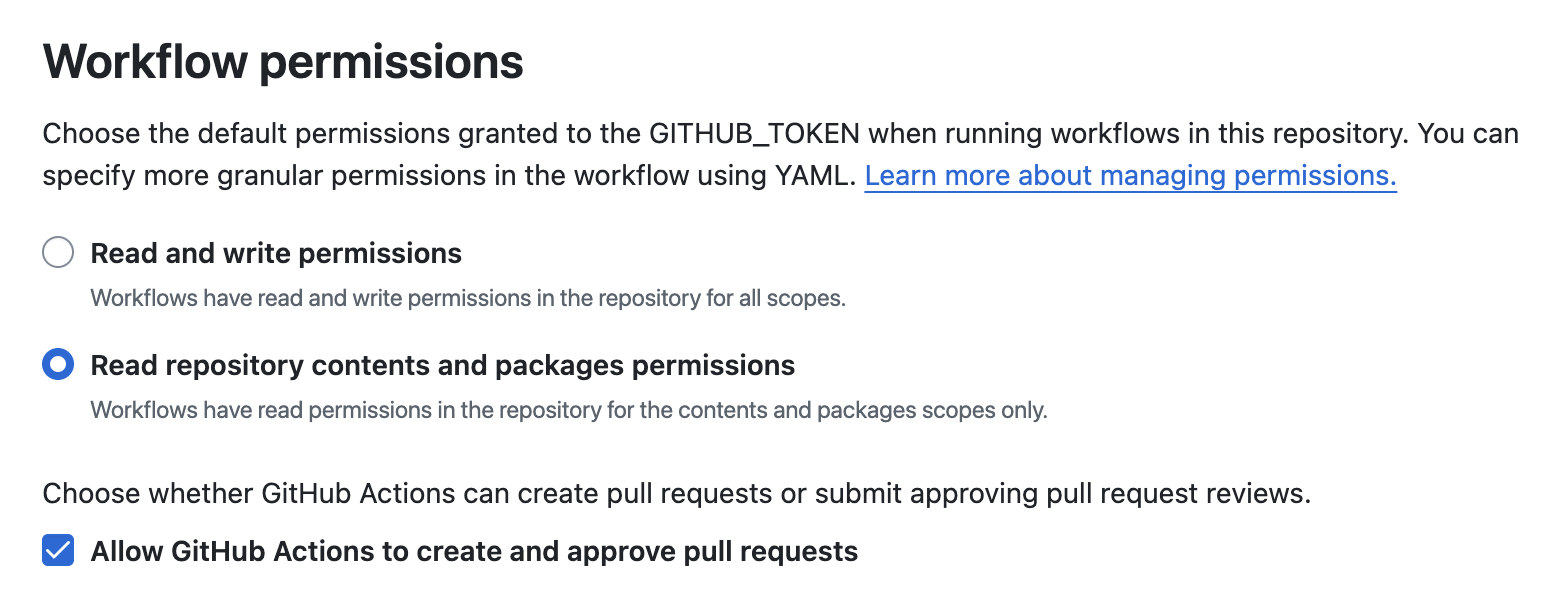
You'll also need to set up the correct permissions for your workflow. At the top of the file, before jobs:, add the permissions: section:
permissions:
  contents: write # allows creating branches and committing changes
  pull-requests: write # allows creating pull requests
Make sure your repository is set up to allow GitHub Actions to create pull requests. Go to Settings > Actions > General > Workflow permissions and make sure Allow GitHub Actions to create and approve pull requests checkbox is selected:
See Self-Healing Tests for more details on how self-healing works.
Step 4: Add test result reporting (optional)
GitHub action summary
Add a Markdown summary directly to the GitHub Actions run view:
      - name: Generate Test Reports
        if: always()
        run: |
          npm exec playwright-json-to-markdown test-results/report.json >> $GITHUB_STEP_SUMMARY
          npm exec playwright-json-to-html test-results/report.json
Note that the second run line generates a standalone HTML report that is included in the test results. The test results are saved as a GitHub workflow artifact in the last step of our original workflow file. If you want the HTML report to be in the artifact download, place this step between the Run tests and Save test results steps.
Slack notifications
Send test results to a Slack channel:
      - name: Post to Slack
        if: always()
        env:
          SLACK_WEBHOOK_URL: ${{ secrets.SLACK_WEBHOOK_URL }}
        run: |
          if [ -n "$SLACK_WEBHOOK_URL" ]; then
            WORKFLOW_URL="${GITHUB_SERVER_URL}/${GITHUB_REPOSITORY}/actions/runs/${GITHUB_RUN_ID}"
            SLACK_PAYLOAD=$(npx playwright-json-to-slack-json --report-url "$WORKFLOW_URL" test-results/report.json)
            curl --header 'Content-type: application/json' --data "$SLACK_PAYLOAD" "$SLACK_WEBHOOK_URL"
          else
            echo "SLACK_WEBHOOK_URL secret not present, skipping Slack notification."
          fi
Tip: Commit cache files
Donobu caches AI action sequences in .cache-lock/ files. These should be committed to your repository alongside your tests so that:
- All CI runs start with a warm cache (faster, fewer AI calls needed)
- All team members share the same cached sequences
- Deterministic reruns are consistent across environments
What you learned
npx donobu testruns in CI just like locally — same command, same flags.- Self-healing (
--auto-heal) automatically fixes tests broken by UI changes. - Cache files (
.cache-lock/) should be committed for fast CI runs. - API keys are stored as GitHub secrets and passed as environment variables.
- Reporting can be added with
playwright-json-to-markdownandplaywright-json-to-slack-json
What to try next
- See the full CI/CD Integration reference for complete workflow examples and other CI platforms
- Learn about Caching to understand cache invalidation and warm-up strategies
- Set up the MCP Server so your AI IDE can test features during development